The meeting-to-task gap is where execution dies
You finish a call. You have notes. Maybe even “action items.” Then Slack pings, another meeting starts, and those notes turn into a forgotten document. The gap isn’t a lack of effort. It’s a missing conversion step: turning raw notes into scheduled work while the context is still fresh.
This 5-step workflow is designed to be completed in under 10 minutes after every call. It’s tool-agnostic, but it works best in a single workspace where notes, tasks, and the calendar live together—exactly the kind of workflow Routine is built for.
The 5-step workflow to turn notes into time-blocked actions
Step 1: Capture decisions and owners, not a transcript
Right after the call, take 60–90 seconds to rewrite the messiest parts of your notes into “decision-quality” lines. You’re not polishing. You’re extracting what matters:
- Decisions: what was agreed and what is now true.
- Owners: who is responsible for the next move.
- Deadlines: what date (or meeting) this must be done before.
If your notes are detailed, keep them. But pull the outcomes to the top so they don’t get buried. This is the fastest way to prevent “we talked about it” from becoming “we never did it.”
Step 2: Convert every action into a verb-first task
Scan your notes and highlight anything that implies work. Then convert each item into a task that starts with a verb and has a concrete deliverable. Examples:
- “Follow up with Legal” → Send Legal the updated MSA and request redlines
- “Investigate churn spike” → Pull churn cohort for March and identify top 3 drivers
- “Prep next call” → Draft agenda and share 24 hours before Tuesday sync
Verb-first phrasing forces clarity. If you can’t name the deliverable, you don’t have a task yet—you have an intention.
Step 3: Assign a time estimate and a “by when” constraint
Most task lists fail because they’re flat. A 3-minute message sits next to a 3-hour analysis, and both look equally urgent. Add two attributes to each task:
- Time estimate: 5 min, 15 min, 30 min, 60 min, 90 min, or 2+ hours.
- Constraint: “by EOD,” “before next meeting,” or a specific date.
Keep estimates rough. The goal is scheduling realism, not accuracy. If you routinely underestimate, adjust the default upward (e.g., if you think it’s 30 minutes, block 45).
Step 4: Time-block the next physical action, not the whole project
This is where the gap closes. Instead of dumping tasks into a backlog, you immediately schedule the next tangible step for each item that matters. Not everything needs a calendar block. But anything tied to momentum, coordination, or deadlines should get one.
Use these rules to stay fast:
- Under 10 minutes: do it now if possible, or batch into a single “Admin” block later.
- 10–45 minutes: time-block it directly on the calendar today or tomorrow.
- 45+ minutes: block the first session now, then decide on follow-up blocks after you complete it.
Time-blocking the next action prevents overplanning. It also makes projects start moving immediately, which is usually the hardest part.
Step 5: Publish the recap in one place and link tasks to context
Execution improves when everyone can find the same truth. Create a short recap that includes:
- Decisions
- Action items with owner and due constraint
- Open questions
- Link to notes or relevant documents
Then make sure each task has a pointer back to the meeting context (a link, a note reference, or a copied “why this matters” line). Without context, tasks become cryptic in 48 hours.
If you work with recurring meetings, a shared agenda and shared notes help avoid re-litigating old topics. If you want a deeper approach to aligning after discussions, the system-diagram method is a strong companion: From Meeting Notes to Shared Understanding With a 30-Minute System Diagram Workflow.
A practical 10-minute template you can repeat after every call
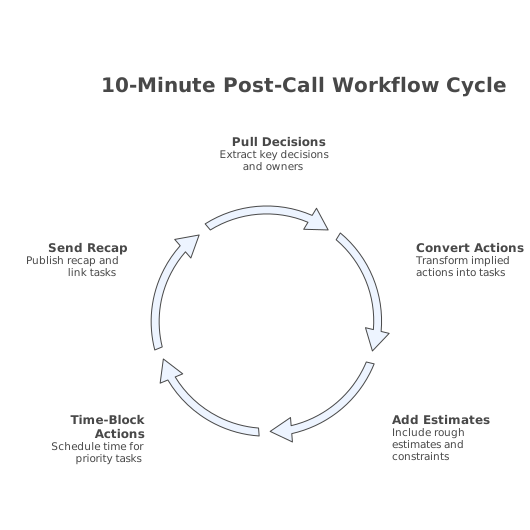
Use this cadence to keep the workflow tight:
- Minute 0–2: Pull decisions + owners to the top of the notes.
- Minute 2–5: Convert implied actions into verb-first tasks.
- Minute 5–7: Add rough estimates and constraints.
- Minute 7–9: Time-block the next physical action for priority tasks.
- Minute 9–10: Send/publish recap and ensure tasks link back to context.
The key is consistency. If you do this after every customer call, internal sync, or project meeting, your calendar becomes the execution plan—not just a record of conversations.
Common failure points and quick fixes
Your tasks are too vague to schedule
Fix: force a deliverable. If the task doesn’t produce something you can name, rewrite it. “Think about pricing” becomes “Draft 3 pricing options with pros/cons.”
You time-block everything and your calendar becomes fiction
Fix: only time-block what drives momentum. Backlog the rest. A calendar packed with aspirational blocks creates guilt, not progress.
You lose KPI meaning between notes, dashboards, and follow-ups
Fix: whenever a meeting produces metric-related tasks, write the KPI definition directly into the task or recap. Otherwise, you risk teams executing against different interpretations. This is exactly what metric mapping drift looks like in practice—worth addressing early: Metric mapping drift and how to keep KPI definitions consistent across platforms.
Where Routine fits naturally
The workflow works in any system, but it’s fastest when you don’t have to jump between a notes app, a task manager, and a calendar. Routine’s core idea—capturing notes and turning tasks into scheduled time blocks in one workspace—maps directly to the “under 10 minutes” requirement. The less friction between “I wrote it down” and “it’s on the calendar,” the smaller the gap.
Vertical Video